pico

Diberdayakan oleh Blogger.

Kamis, 31 Januari 2013

Nokia Pinout

Photobucket Software Losnn Clamp_Setup_V2.2.0 yang diserta dalam setiap pembelian produk Losnn NK-FBUS Cable ini cukup lengkap koleksi gambar nokia pinout seri terbarunya. Yaitu penambahan seri Nokia: 1116(RH-93), 5236(RM-625), 303(RM-763), 3030(RM-763),300(RM-781), 3000(RM-781.

Bagi yang kesulitan mencari gambar pinout dari nokia, silahkan download Free Software nya berikut ini :

Losnn Clamp_Setup_V2.2.0 part01

Losnn Clamp_Setup_V2.2.0 part02

Losnn Clamp_Setup_V2.2.0 part03

Losnn Clamp_Setup_V2.2.0 part04

Losnn Clamp_Setup_V2.2.0 part05

Losnn Clamp_Setup_V2.2.0 part06

Losnn Clamp_Setup_V2.2.0 part07

Semoga bermanfaat.

Rabu, 03 Oktober 2012

HARD RESET SAMSUNG

Samsung Galaxy Fit S5670 Hard Reset
Disclaimer : By performing hard reset, all data on device storage will deleted. So backup your important data first.

Samsung Galaxy Fit S5670 Hard Reset Procedures :

1. Power off phone

2. Press and hold Menu Button + power on for at least 10 seconds

3. Android System Recovery Mode Appear

4. There are 4 options

- reboot system now

- apply sdcard:update.zip

- wipe data/factory reset

- wipe cache partition

5. Move the options to " Wipe data / factory reset " using volume down ( - ) button and menu button to confirm, because the touchscreen doesn't work in reovery mode

6. After the process done, phone will reboot.

.

Hard Reset HP Samsung Galaxy Mini S5570

Hard Reset is a return phone to original condition, all data on mobile phone will be lost / deleted all, maybe in between my friend who has a Samsung Galaxy Mini is like trying to hard reset the phone to the alias you want to restore the initial condition / new, if so it's how ,

> If necessary, make sure all data is already in backup

> Turn off the first HP

> Then press and hold the home button, then the power button

> Hold up a few seconds to enter the recovery menu

> If you are in, release the home button and power

> In the recovery mode menu there are 4 options

# ...

# ...

# Wipe data / factory reset

# ...

Select the 'wipe data / factory reset "(Use the volume keys) then press the Home

Wait until the process is complete

Then select the menu "reboot system now"

Finish - The condition returned to baseline HP / new

.

Samsung Galaxy S I9000 Hard reset solution

Samsung Galaxy S I9000 Hard reset solution

following ARE THE STEPS

1. REMOVE BATTERY & PUT IT BACK

2. HOLD VOLUME UP BUTTON & MIDDLE BUTTON (HOME BUTTON)

3. WHILE HOLDING THIS TWO BUTTON PRESS POWER BUTTON AND REALEASE(PRESS POWER BUTTON ONLY ONCE)

4. IT WILL POP UP WITH HARD RESET MENU

5. SCROLL DOWN TO FACTORY RESET WITH VOLUME DOWN BUTTON THEN PRESS CENTER BUTTON OR HOME BUTTON

6. THEN PRESS VOLUME DOWN BUTTON TO SELECT YES FACTORY SETTINGS THEN PRESS CENTER BUTTON

7. SELECT REBOOT DEVICE AND PRESS CENTER BUTTON

.

Samsung Galaxy Gio S5660 Hard Reset

Kamis, 09 Agustus 2012

Apa itu MRS TOOLS ?

MRS TOOLS adalah sebuah karya anak bangsa yang dibuat dengan sangat sederhana tetapi memiliki kemampuan yang luar biasa untuk memperbaiki permasalahan software yang sering kali kita temui pada handset BlackBerry seperti RED BLINKING atau ERROR JVM. Walau sudah banyak beredar dongle serupa akan tetapi MRS TOOLS punya kelebihan yaitu antara lain :

.

* Tanpa Aktivasi ( Without Activation )

- Aplikasi bisa langsung dijalankan tanpa harus melakukan proses aktivasi terlebih dahulu.

.

* Tanpa Registrasi ( Without Reegistration )

- Tidak perlu diregistrasi lagi karena aplikasi ini sudah dibuat siap pakai dan tidak perlu harus repot-repot konek internet terlebih duhulu.

.

* Computer Unlimited

- Karena Aplikasi MRS TOOLS ini sudah dikemas dalam sebuah Flashdisk sehingga dalam penggunaannya bebas dihubungkan ke komputer manapun.

.

Dongle

Fitur apa saja yang terdapat pada MRS TOOLS ?

.

* Auto Install Full OS ( Easy to Flash OS )

* Auto Factory OS / FOS ( Easy make Device to Factory OS )

* Auto Reset LCD / Clear LCD ( Easy reset LCD to all type series )*

* Auto WIPE or Erasing ( Easy to erase device with selection area )

* Auto Reset MEP 0 / Hard Protect ( Easy to Repair MEP 0 )*

* Auto Calculate MEP ( Easy to Unlock no need internet connection )

* Quick To Instal Application ( Easy to install 3party application, exp. fb, appworld,YM, Blackberry Massager ..etc )

* Checking Flash Firmware ( Easy to check firmware SFI/MFI/BIN )

* Auto Repair Connecting JVM

* Auto Repair Red Blinking

* Support All Javaloader Function Needed

* Autorun Without Desktop Manager

* Can Flashing Without Battery

* I-Phone Unlock )*

* Android Repair Software

* USB Modem Unlock

* And Other Feature ( Coming Soon )

.

" Efisien " itulah satu kata yang layak diberikan untuk MRS TOOLS ini. Karena bisa dibawa-bawa dan digunakan pada komputer yang mana saja. Soal keampuhannya ? Tidak diragukan lagi. Dari beberapa kali ujicoba pada perbaikan Red Blink dan Error JVM semuanya berjalan sukses tanpa kendala.

.

MRS TOOLS saat ini masih versi 1.2 dan dalam waktu dekat akan diupdate lagi ke v1.3 dengan penambahan berbagai fitur yang tentunya lebih baik daripada versi sebelumnya.

.

Bagi kawan-kawan yang ingin melihat bentuk aplikasinya dapat mendownload versi 1.2-nya DISINI

.

Nah ....tunggu apa lagi. Segera miliki MRS TOOLS sekarang juga untuk menambah "alat tempur" bagi para Teknisi Handphone.

.

Berminat, silahkan hubungi :

HARDI ( +62 85313399663 )

.

Untuk infomasi lebih jelasnya mengenai MRS TOOLS silahkan DISINI

.

MRS TOOLS TRIAL VERSION >>>> DOWNLOAD

Sabtu, 05 Mei 2012

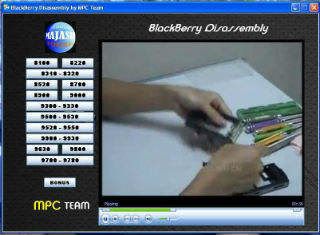
Blackberry Disassembly

One Click Application for Blackberry
Download here :

PART 1

PART 2

PART 3

PART 4

PART 5

Selasa, 27 Maret 2012

Flashing LG GW-300 via USB

Alat perang yang diperlukan :

1. SETUP_GSMULTI_V30.................download DISINI
2. Setup_USB_PortMapping_04........download DISINI
3. GW300_090625.dll.....................download DISINI
4. Firmware GW-300 BI..................download DISINI
4. Baca Aturan Pakai.....................download DISINI

Step by step flashing nya :
1. Download semua alat tempur
2. Install SETUP_GSMULTI_V30.............otomatis akan dibuatkan folder di C:\GSMULTI
4. Install Setup_USB_PortMapping_04.exe, hasil installer adalah Driver usb yang
disimpan di C:\GSMULTI\UsbDrivers\MTK
5. Hubungkan HP (tanpa batrei) ke PC melalui kabel USB, tunggu hingga PC mendetect.
6. Ketika PC meminta driver, arahkan ke C:\GSMULTI\UsbDrivers\MTK, kemudian klik
next sampai driver selesai diinstal.
7. Klik USB Map V4 di folder C/GSMULTI, pilih MTK, klik Start Mapping, Hubungkan HP
( kondisi mati ). kalo udah terdetect klik save exit.
8. Lalu klik MultiGSM_V30.exe ( di C:\GSMULTI )
kemudian masuk ke Tab Setting ==> Configuration.
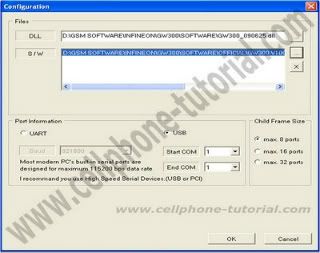
Untuk DLL, pilih GW300_090625.dll yg sudah di download tadi
Pilih Firmware LG GW300 yg sudah di download sebelumnya.
Pilih port information nya USB
Untuk settingan yg lainnya biarkan Default, kemudian klik OK seperti gambar berikut ini :

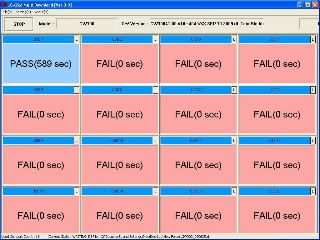
9. Langkah terakhir..., Klik START dan tunggu hingga Proses selesai ( ada keterangan PASS )
kalo ada error atau proses gak berjalan.., coba reconnect HP ke PC dan klik START lagi...
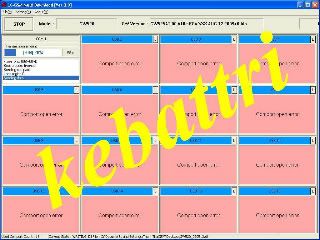
Proses flashing sedang berjalan :

Proses flashing selesai dan berhasil ( PASS (589 sec))

Hosting Gratis...Daftar yuuu

JOIN DISINI...IKUTI UPDATE TERBARU


Copyright © 2009 by TRIK SERVICE PONSEL